IP Filter (only for SaaS Systems)
You can use the IP filter to restrict access to your application to specific IPs for SaaS/cloud systems. To do this, you must define IP addresses in the CIDR (Classless Inter-Domain Routing) notation. Use the CIDR suffix to specify whether to filter by an exact IP address or an IP address range.

Updated
by Tim Kastens
If the IP filter is configured incorrectly, you can deprive yourself and other employees of access to the application. Therefore, please use this function only if you can estimate the effects.
You can use the IP filter to restrict access to your application to specific IPs for SaaS/cloud systems. To do this, you must define IP addresses in the CIDR (Classless Inter-Domain Routing) notation. Use the CIDR suffix to specify whether to filter by an exact IP address or an IP address range.
The valid CIDR IP addresses can be entered via <Add>. The format (IPv4+Suffix) can be taken from the picture below:
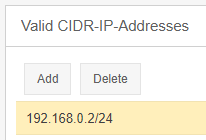
Several CIDR IP addresses can be stored.
The filter only becomes effective when the "IP Filter activated" checkbox is checked.
How did we do?
Password security
API Profile (Additional module)
