Password security
These settings only affect locally created users who are not synchronized with a connected Active Directory.. Password settings. First, you can specify the number of days after which a user must chan…

Password settings
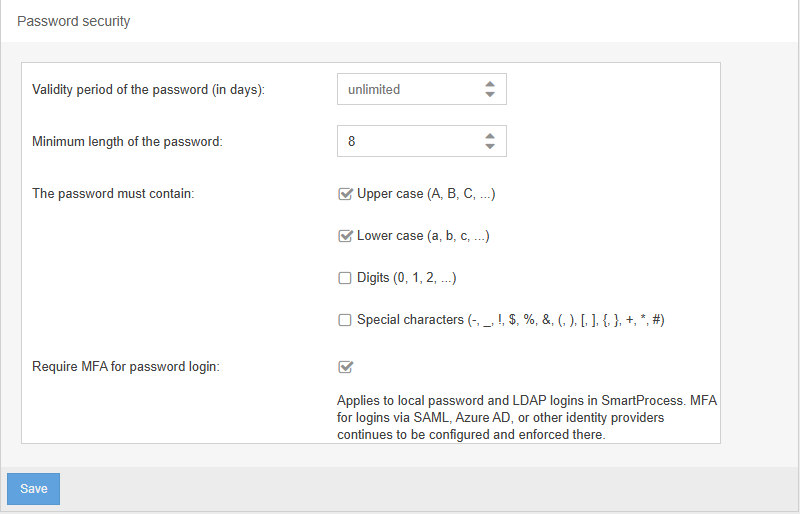
First, you can specify the number of days after which a user must change their password. If you leave the field empty, user passwords will never expire.
You can also define minimum requirements that users must meet when setting their password. These include the minimum length of the password and whether it must contain at least one uppercase letter, lowercase letter, number, or special character.
MFA for password login
If this checkbox is selected, each user must set up multi-factor authentication (MFA) for themselves using any authenticator app (e.g., MS Authenticator, Google Authenticator, Sophos Authenticator).
Once set up, the user will not only be asked to enter their username and password each time they log in, but will also need to input the code from the configured authenticator app.
Automatic temporary access blocking
To protect the system from brute force attacks, access for users is blocked if several incorrect password entries are made for a user name within 5 minutes.
If the user has already successfully logged in once, 10 attempts are available. If the user has not yet logged in, 5 attempts are available.
If the access block is triggered, the user's login is blocked for 30 minutes. For documentation purposes, the system also creates an item in the audit trail for this event.
How did we do?
User notifications
IP Filter (only for SaaS Systems)
