User notifications
You can set the default for e-mail notifications for new users. The settings at this point affect new users only. For users who have already been created, the notifications must be customized in the…

You can set the default for e-mail notifications for new users.
Follow Settings > Configure Application > User Notifications to the email notification settings.
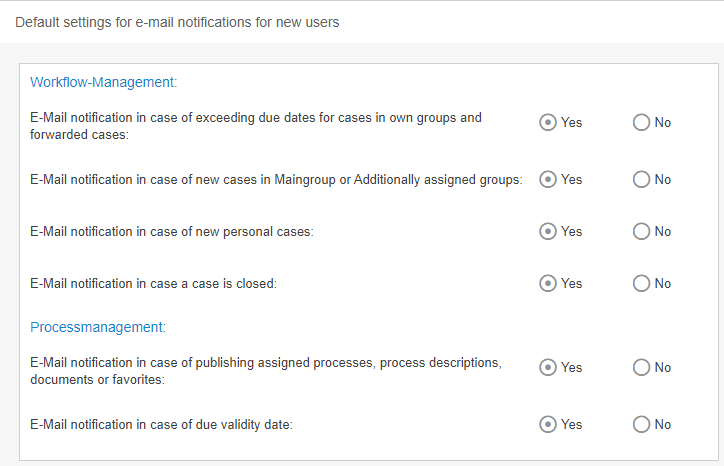
Option (Workflow processing) | Description |
Mail notification in case of exceeding due dates for cases in own groups and forwarded cases | Sends an e-mail to the user when the deadline of a case directly assigned to the user is exceeded. Sends an e-mail to the user when the deadline of a case assigned to an org. unit to which the user belongs is exceeded. Text modules system e-mails: - Case Reactiondate Exceeded Notification - Case Reactiondate Exceeded Notification (escalation mailboxes) - Case Reactiondate Exceeded Notification (own reactiondates) |
Mail notification in case of new cases in Maingroup or Additionally assigned groups | Sends an email to the user when a new, unassigned case is received in an organizational unit to which the user belongs. Text modules system emails: - Case Received Notification |
Mail notification in case of new personal cases | Sends an email to the user when a new task is received directly to the user. Text Blocks System Emails: - Case Received Notification |
Mail notification in case a case is closed | Sends an email to the user when a task is completed (closed) that the user has been working on. Text modules system emails: - Case Closed Notification |
Option (Process Management) | Description |
Mail notification in case of directly publishing assigned processes, documents or favorites without the approval workflow | Sends an email to the user when an assigned process or document is published without the approval workflow. Text modules system emails: - Process management - Process published - Document management - Document published |
Mail notification in case of due validity date | Sends an email to the user when the user has been entered as the process owner / process manager or document responsible and the reminder date for the validity of the process or document has been exceeded. The validity is set directly on the respective object Text modules System e-mails: - Process management - validity limit reached - Document management - validity limit reached |
How did we do?
Directory services (AD, Entra ID / Azure AD) and single sign-on
Password security
