Workflow object: Start, intermediate and end event
In workflow modeling, you must work with events that are displayed as statuses in the operation. The following events can be used in modeling: Start event. Each workflow requires a start event, since…

In workflow modeling, you must work with events that are displayed as statuses in the operation. The following events can be used in modeling:

Start event
Each workflow requires a start event, since this is the first status the case receives when it is generated by the system.
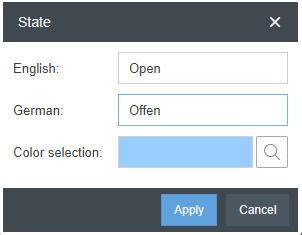
The name of the start event can be changed in the object's properties by clicking on "Edit".

In the editing window of the status, you can also change the color that is displayed in the case list next to the status.

Intermediate event
Any number of intermediate events can be added to a workflow process model. In the properties of the intermediate event a new status name and a color for this status can be defined via <+>. (See Start Event)
End event
Each workflow requires an end event. The end event ensures that the task is closed and is no longer listed among the active tasks.
Closed tasks can be viewed for 3 months in the "Participated" list. After that they can only be evaluated via reporting.
The name of the end event can be changed in the object's properties by clicking on "Edit".
How did we do?
Workflow object: Send e-mail
Workflow object: Timer
