Table of Contents
MCP interface (Additional module)
With the chargeable add-on module, an MCP interface can be set up in SmartProcess. MCP stands for Model Context Protocol and enables other AI systems to securely access SmartProcess content and integ…

Table of Contents
To use the MCP module in SmartProcess, you need at least version 26.7 of SmartProcess (released in August 2026) and must order the add-on module from CWA.
Calling the MCP Interface
The MCP interface is called via the following endpoint: https://SUBDOMAIN.smartprocess.com/smart-connect
Here, SUBDOMAIN is a placeholder for the actual subdomain of your SmartProcess installation.
Setting up the MCP interface
If the module has been purchased, you’ll find the MCP Interface option under Settings --> Configure Application, where you can set the authentication method.
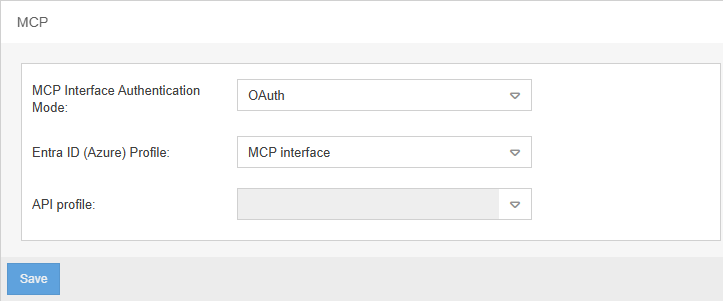
Under MCP Interface Authentication Mode, there are 3 options to choose from:
MCP Interface deactivated | In this case, the interface is inactive, so external AI agents cannot access SmartProcess content. |
OAuth | In this case, a Microsoft Entra ID profile must be selected for authenticating the external AI system. This profile must first be set up in the SmartProcess setting Directory services and single sign-on. For the AI agent to successfully connect to this interface, the data for the application ID, application secret etc. in its configuration must match the information in the Entra ID profile in SmartProcess. 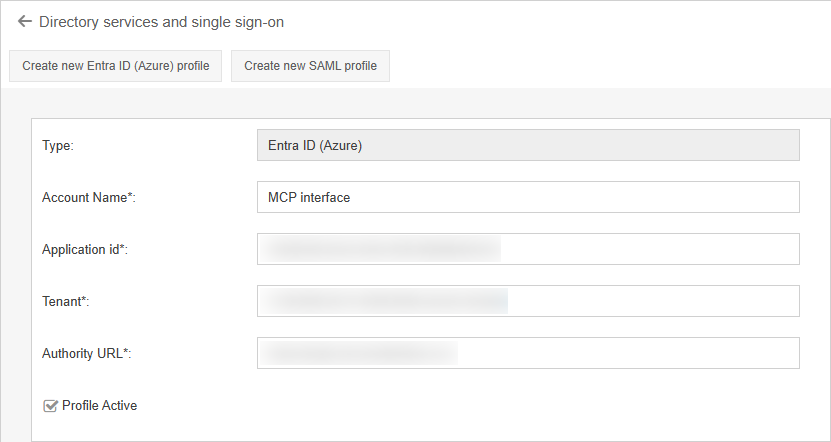 If Entra ID is also used to log in SmartProcess users, the user can be uniquely identified by their username or email address when they make requests via the external AI agent. This ensures that, in this case, each user’s individual access rights to processes, documents and wiki entries are taken into account for every request made via the AI agent. |
API-Key | In this case, an API profile must be selected for authenticating the external AI system. This profile first needs to be set up in the corresponding SmartProcess settings. If the API profile is to be used exclusively for authenticating the MCP interface and not for accessing the REST API for transaction data, catalog data, etc. the REST API add-on module is not required. To successfully connect the AI agent to this interface, the following must be ensured:
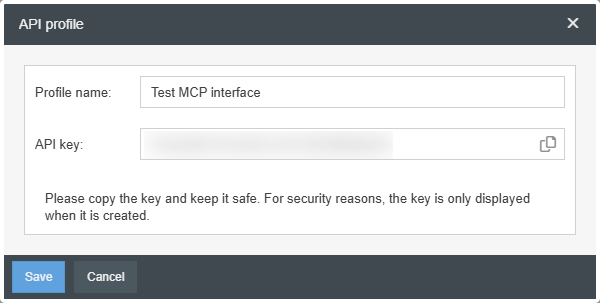 Because an API profile is always assigned to one specific SmartProcess user, this option cannot take individual access rights to processes, documents, and wiki entries into account. Therefore, for any request made via the AI agent, the access rights of the user assigned to the API profile in SmartProcess are always applied - regardless of who formulates the request. |
FAQ on the MCP Interface
What is the Model Context Protocol (MCP)?
Why use an MCP interface?
How can the MCP interface be connected?
Which AI systems can be used with the MCP interface?
What SmartProcess content can be accessed via the MCP interface?
- Published processes
- Published documents
- Entries in the Wiki menu
Relevant text passages from these entries are transmitted to answer user queries.
Are access rights to SmartProcess content taken into account?
When authenticating via API key, all requesting users are provided information on processes, documents, and wiki entries with identical read permissions, which depend on the user specified in the API profile configuration.
Details are described above in the section Setting up the MCP interface.
How did we do?
SmartAI knowledge questions assistant
