Document type
The Document Type catalog is used to define the categories into which the documents in the document management can be classified. In a previous version, this item was assigned to the Catalogs menu it…

The Document Type catalog is used to define the categories into which the documents in the document management can be classified.
The management of document types is done in the same way as for other catalogs. However, in comparison to a "normal" catalog, the available fields for a document type are fixed and cannot be adjusted in the catalog configuration.
This is due to the special function of the catalog. If automatic numbering is activated in the settings for documents, the document type is the base for generating the automatic number for a newly created document.
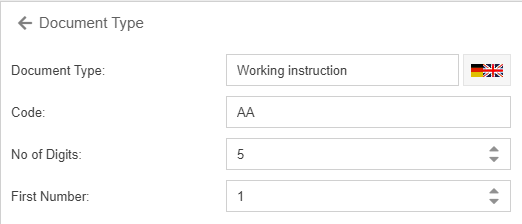
The automatic document number consists of the code of the document type, followed by a hyphen and a number with a length of "No of digits", which is incremented consecutively starting with the "First number".
In the example, the first document with the document type Working instruction is assigned the document number "AA-00001". The next document of the type Working instruction receives the number "AA-00002", and so on.
How did we do?
Document templates
Settings for the organizational chart
