Version 9.1.0.5 Release Notes
New features and changes from 09.01.2020: In the Documents menu, several file attachments can be downloaded simultaneously via the button <File export>. Viewers can only see the comments for processe…

Updated
by Dennis Reichle
New features and changes from 09.01.2020:
- In the Documents menu, several file attachments can be downloaded simultaneously via the button <File export>.
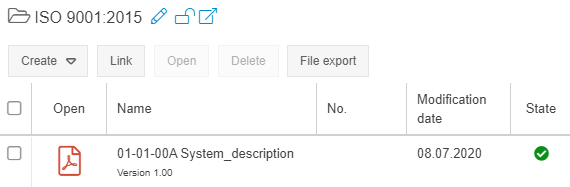
- Viewers can only see the comments for processes that refer to the currently published version. Historical comments can be viewed by the process owner/manager and users with editing rights for the process.
- For each user, the new tab "Processes and Documents" lists the processes and documents for which the user is assigned as a responsible (process owner / document responsible) or user (process participant / document user). The tab is displayed when editing a user in the user administration or opening the person's properties in the organizational chart.
- In workflow modeling, an individual text module can now be selected for the Forward case object, which is sent to the recipient of the case as an e-mail.
- A warning message appears if an attempt is made to delete an Org. Unit that is still assigned to users as Main Group (only applies if the organizational chart is edited via "Settings -> Users, Rights and Groups -> Organizational Units / Groups / Roles").
- If the e-mail settings in SmartProcess are configured so that a new case is created by newly received e-mails, the subject of this e-mail can now be transferred to any text field in the main form of the workflow.
- When reporting swimlanes, the new column "Participants" shows which organizational units / roles are assigned to a swimlane.
- Text modules can now already be edited with an editor license.
- Feedback for processes and documents that have been submitted by creating a new feedback case can now already be edited with a viewer license.
You can see your current version in the menu "Settings - Info about version - Version".
How did we do?
Version 9.1.0.6 Release Notes
Version 9.1.0.4 Release Notes
