Audit Trail
In the Audit Trail setting, it is documented for various actions in SmartProcess which user performed them at what time. Content. The following actions trigger an entry in the audit trail: Publishing…

Updated
by Dennis Reichle
In the Audit Trail setting, it is documented for various actions in SmartProcess which user performed them at what time.
Content
The following actions trigger an entry in the audit trail:
- Publishing a process group, process or document with or without the approval workflow
- Withdrawal of the publication of a process group, process or document
- Deleting a process group, process or document
- Login of a user in SmartProcess
- Login of a CWA employee via maintenance user
- A user has customized the Manage maintenance access setting
- If the automatic temporary blocking of access for a user is triggered by repeated incorrect entry of the password
- Each step in the case processing that requires the user's signature (both signature field and password entry)Whether a signature is required for the processing of case or task forms can be defined in the workflow settings of the workflow or task.
Columns
- Action -> The action performed by the user
- Type -> The object for which the action was performed by the user (process, document, name of the workflow or "Login temporarily blocked")
- Reference
- The process number for processes
- The document number for documents
- The case number for cases
- Description
- For processes and documents: The name, version number and version description or reason if publication has been withdrawn
- For cases the subject
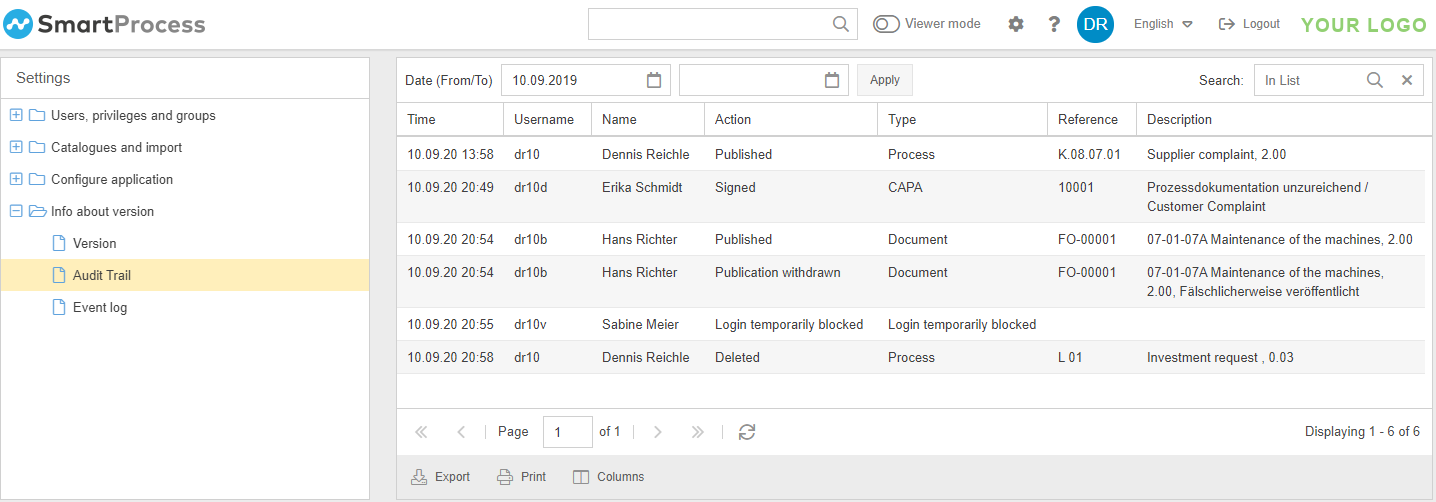
The entries in the audit trail are created automatically and cannot be deleted. It is possible to filter the entries by date, by using the column headers of the tables or the "Search in list" function.
To access the Audit Trail menu item, the user must have an authorization profile in which the "Admin" right is set to "Yes".
How did we do?
Word report designer for printouts (Additional module)
Export archive
