Table of Contents
Workflow object: Decision
Decision branches are used to branch an operation depending on a state or an input. The conditions for decisions must be entered in the workflow engine of the branch. A decision can only have two out…

Table of Contents
Decision branches are used to branch an operation depending on a state or an input. The conditions for decisions must be entered in the workflow engine of the branch. A decision can only have two outcomes - Yes and No.
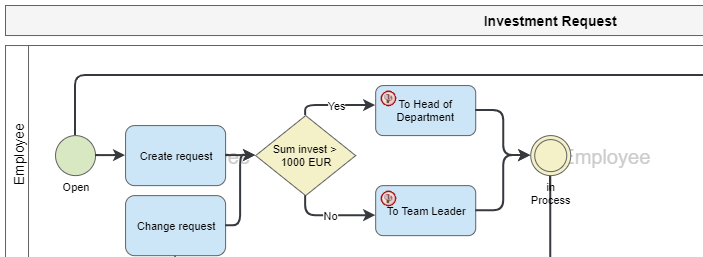
A name should always be entered in the properties of a decision branch so that one can already infer which conditions are considered in the process model.
Define conditions of a decision.
The conditions can be defined in the branch properties in the workflow engine. The branch properties can only be edited if the process model is open in the Process Designer.
A new condition for the decision can be defined using the button <+ Add condition>.
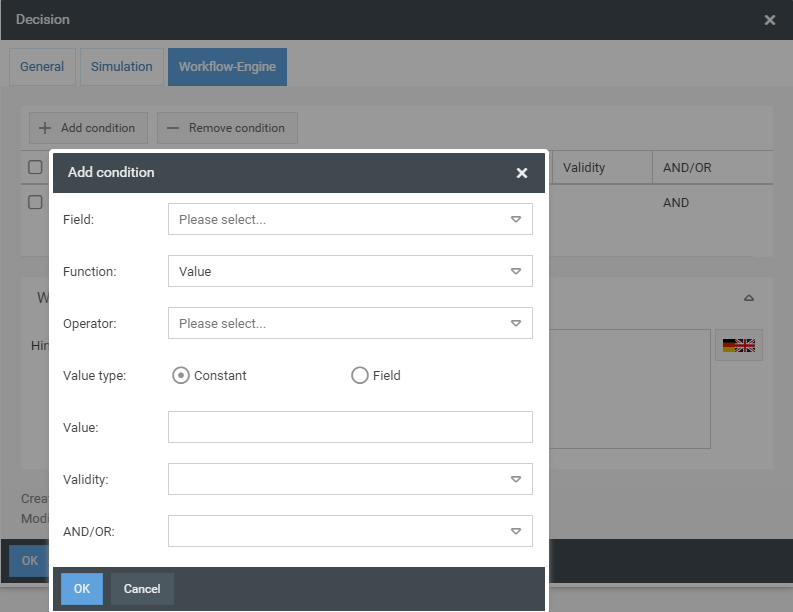
A condition always refers to the value of a particular field. The field "Field" lists all available fields that can be used for the condition. These include all self-modelled fields of the main form, certain standard fields that each case automatically creates and saves, such as information on the creation, processing and status of the operation, and the fields of the tasks. The task fields are characterized by the fact that the name of the task appears before the field name (for example, Approve investment - Approved).
In the field "Function" it is set that the condition refers to a value of the selected field.

In the Operator field, the operator of the condition can be specified. Different operators are available here depending on the field type of the selected field. In addition, the value type must be specified here, i.e. whether the selected field contains a specific value or whether the field is to be set in relation to another field. The reference value is then entered in the "Value" field.
Operators
Operator | Description |
= | The value of the field is equal to the value of the "Value" field |
!= | The value of the field is not equal to the value of the "Value" field |
< | The value of the field is less than the value of the "Value" field |
<= | The value of the field is less than or equal to the value of the "Value" field |
> | The value of the field is greater than the value of the "Value" field |
>= | The value of the field is greater than or equal to the value of the "Value" field |
beginnt mit | The value of the field begins with a string of the value of the field "Value" |
enthält | The value of the field contains a string of the value of the field "Value" |
endet mit | The value of the field ends with a string of the value of the field "Value" |
Validity of a condition
In the Validity field, you can set which field value from which activity is to be taken into account, provided the condition was set to a field value of a task.
Validity | Description |
all activities (Condition must match all activities) | If a task has been executed more than once and therefore there are several tasks in the activity list, the stored condition must be fulfilled for all tasks. |
one activity (Condition must match one activity) | If a task has been executed more than once and there are therefore several tasks in the activity list, the condition stored for one task must be fulfilled. |
last activity (Condition must match last activity) | If a task has been executed more than once and there are therefore several tasks in the activity list, the condition stored for the last task must be fulfilled. |
from state change (Condition must apply to all activities last created between two status changes) | If a task has been executed more than once and there are therefore several tasks in the activity list, the stored condition must be fulfilled for all tasks that were executed after a status change. |
Logical Operators
In the field "AND/OR" a logical operator can be set, which ensures that the configured condition is linked (AND) or separated (OR) with another condition.
Decision without NO outcome
A decision can also be modeled without a "no" output. In this case the process will wait at the decision until the configured condition is met.
Workflow-Hint
A hint can be entered in the "Hint" field, which is displayed when the process waits before branching.
How did we do?
Workflow object: Task
Workflow object: Forward case
