Version 9.1.0.3 Release Notes
New functions and changes from 23.10.2019: For the function Add data to file name for versioned documents it is now possible to append the document type code to the name of file attachments. The "Pro…

Updated
by Dennis Reichle
New functions and changes from 23.10.2019:
- For the function Add data to file name for versioned documents it is now possible to append the document type code to the name of file attachments.
- The "Process manager" field is initially hidden in the details of a process. In the process management settings, you can specify that it should be shown for all processes.
- In addition to the process owner, process managers receive an e-mail notification before the validity of a process expires.
- If the authors of a process are changed in the details, a new sub-version of the process is created.
- Reviewers and approvers can no longer be subsequently entered in the process details. This is only possible during a publication with or without the approval workflow.
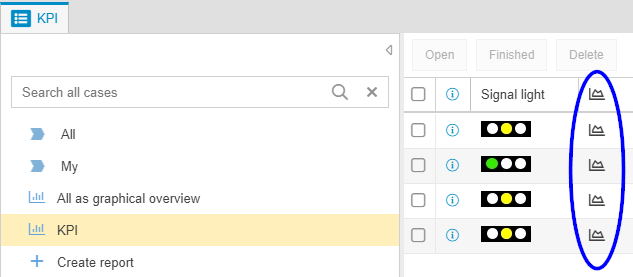
- In the standard report KPI, it is now possible to enable a chart view of the selected KPI using the diagram symbol in the corresponding column.
- The objects group and role are not initially displayed in the organizational chart. You can change this default setting in the settings for the organizational chart.
- When reporting processes and documents, it is now possible to display the ID of the evaluated object as a column.
- For a multi row text field in the workflow form, you can define in the field properties that the value can be entered directly in the activity list.
- Creating and editing documents is now already possible with an editor license.
- When reporting for cases, symbols can now be displayed as field values in cross tables. This is used in the standard report Qualification matrix, for example, to indicate which qualification has been acquired or must still be acquired.
- In the mobile web app, the state of a case is displayed in the case list.
- When setting up profiles in the e-mail settings, a display name for the sender of the e-mail can now be stored in addition to the sender address.
- User-defined fields for organizational units. To view and create user-defined fields, open an organizational unit and select the <Extras> button.
- In the case window, the entries in the activity list can be collapsed or expanded with one click.
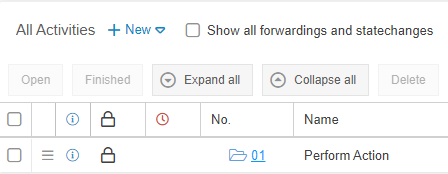
- The last activity of a case is displayed in a separate box in the case window.
- Under Settings -> Configure Application -> Login options and views, you can specify after how many minutes of inactivity a user should be automatically logged out of SmartProcess.
- When printing a process model, the print date is automatically displayed in the footer.
- The automatic e-mail notification that a requested activity has been completed can now be edited in the internal text modules.
- When a new workflow is created in the Process Explorer by right-clicking, the workflow functions of the process are directly enabled.
You can see your current version in the menu "Settings - Info about version - Version".
How did we do?
Version 9.1.0.4 Release Notes
