Table of Contents
- Information in the process description
- Adjust process description
- Placeholders for process description
- Single fields
- Tables
- Participants in Approval Workflow
- Terms and abbreviations
- Requirements
- User-defined fields
- Image or Description from Process details
- Activities (Tasks)
- Image or description from activity
- Adjacent processes
- Start event
- Intermediate events
- End event
- KPI
- Risk
- Chances
- Controls
- IT-systeme & Resources
- Applicable documents
- Data object
- Skills
- Swimlane
- Gateways
- Decision branches
- Version history
- Watermark for unpublished versions
Process description
Information in the process description. In the process description all information of a process is summarized in a PDF file. It can be generated via the correspondingly labeled button above the proce…

Table of Contents
- Information in the process description
- Adjust process description
- Placeholders for process description
- Single fields
- Tables
- Participants in Approval Workflow
- Terms and abbreviations
- Requirements
- User-defined fields
- Image or Description from Process details
- Activities (Tasks)
- Image or description from activity
- Adjacent processes
- Start event
- Intermediate events
- End event
- KPI
- Risk
- Chances
- Controls
- IT-systeme & Resources
- Applicable documents
- Data object
- Skills
- Swimlane
- Gateways
- Decision branches
- Version history
- Watermark for unpublished versions
- Information in the process description
- Adjust process description
- Placeholders for process description
- Single fields
- Tables
- Participants in Approval Workflow
- Terms and abbreviations
- Requirements
- User-defined fields
- Image or Description from Process details
- Activities (Tasks)
- Image or description from activity
- Adjacent processes
- Start event
- Intermediate events
- End event
- KPI
- Risk
- Chances
- Controls
- IT-systeme & Resources
- Applicable documents
- Data object
- Skills
- Swimlane
- Gateways
- Decision branches
- Version history
- Watermark for unpublished versions
Information in the process description
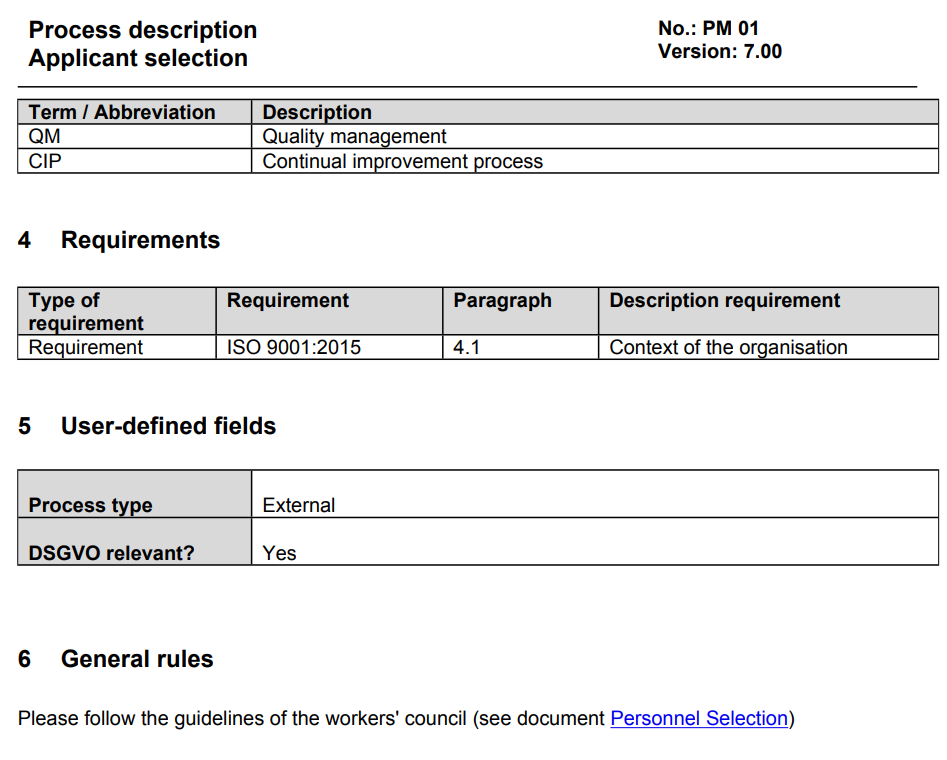
In the process description all information of a process is summarized in a PDF file. It can be generated via the correspondingly labeled button above the process model.

In addition, several process descriptions can also be selected from an overview and then downloaded collectively:
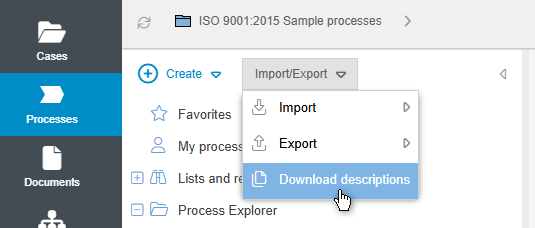
The information that can be listed includes:
- The process details consisting of the purpose and description, scope and general rules of the process
- The defined terms & abbreviations as well as requirements for the process
- The values of the user-defined fields
- A representation of the process model
- The modeled tasks and sub-processes including description and linked artifacts, if applicable
- A tabular list of all artifacts, divided into a joint table for IT systems and resources as well as separate tables for KPIs, risks, controls, opportunities and related documents
- A tabular listing of all ever published versions of the process, including release date and version description
Adjust process description
The process description is a Word document that uses placeholders (mergefields) to access the process data in SmartProcess and outputs it as a PDF file. You can adapt this process description by choosing Settings -> Configure Application -> Word Report Designer for printouts.

In this menu the entry 'Process description' can be selected and then the currently stored process description can be downloaded and opened in Microsoft Word.
In this view the defined mergefields become visible.
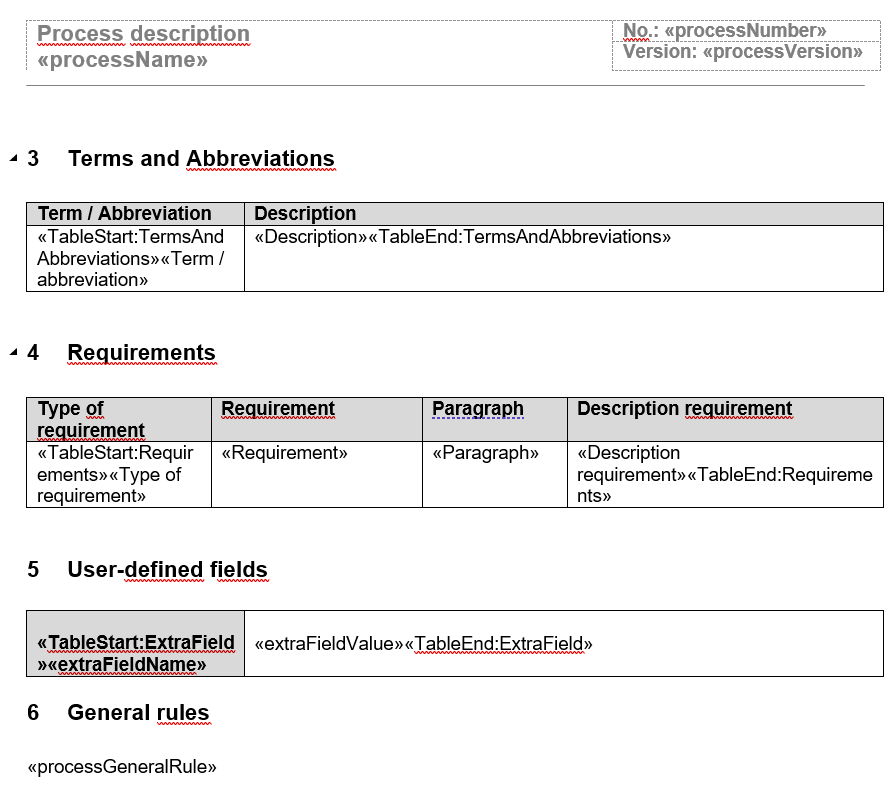
Here you can now change the order and formatting of the contents. If necessary, contents can also be deleted. After the adjustments have been made, the Word document is saved and then uploaded again from the drive using the <Select file> button in the Word Report Designer for printouts menu in SmartProcess.
Additional content for the process description
The example document with mergefields does not list all information of the process that can be output via Mergefields. To add more information, you must first create a new mergefield at the point in the Word document where the content should appear (see article Word Report Designer for printouts)
Add information to an existing table
To add mergefields to tables such as the KPI table, an additional column should be inserted in the middle of the table.
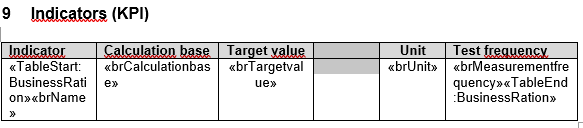
In the top line, you can enter the information to be displayed in the column, for example, the description of the KPI. In the bottom line, you create a new mergefield with the desired field name.
Placeholders for process description
Single fields
Content | Field name |
Logo for PDF printout | Image:applicationLogo |
Process name | processName |
Process number | processNumber |
ID of the process | processID |
Process version | processVersion |
Process status | processState |
Process owner | processResponsible |
Process manager | processManager |
Purpose and description | processPurpose |
Scope | processScope |
General rules | processGeneralRule |
Process model | Image:workflowImage |
Process participants (alphabetical, separated with comma) | processParticipants |
Valid from | processReleaseDate |
Valid until | processValidTill |
Publication date | processVersionPublicationDate |
Date of last change | processVersionEditDate |
Department of version creator | creatorFunction |
Name of version creator | creatorName |
Date of version creation | creationDate |
Tables
Participants in Approval Workflow
Table name: Editors
Content | Field name |
Type | editType |
Function | editorFunction |
Name | editorName |
Date | editDate |
Confirmation | editState |
Terms and abbreviations
Table name: TermsAndAbbreviations
Content | Field name |
Term/Abbreviation | Term / Abbreviation |
Description | Description |
Requirements
Table name: Requirements
Content | Field name |
Requirement type | Requirement type |
Requirement | Requirement |
Paragraph | Paragraph |
Description of requirement | Description of requirement |
User-defined fields
Table name: ExtraField
Content | Field name |
Name of field | extraFieldName |
Content of field | extraFieldValue |
Image or Description from Process details
Table name: ProcessImages
Content | Field name |
Title | ProcessImageTitle |
Description | ProcessImageDescription |
Image | Image:ProcessImage |
Activities (Tasks)
Table name: ProcessActions
Content | Field name |
Name of activity | actionDisplayname |
Description | actionDescription |
Process owner of sub-process | actionSubProcessOwner |
Responsible | actionRaciResponsible or actionRasciResponsible |
Accountable | actionRaciAccountable or actionRasciAccountable |
Supportive | actionRaciSupportive or actionRasciSupportive |
Consulted | actionRaciConsulted or actionRasciConsulted |
Informed | actionRaciInformed or actionRasciInformed |
KPI | actionBusinessRatio |
Risk | actionRisk |
Chance | actionOpportunity |
Control | actionControl |
IT-system | actionItSystem |
Resource | actionResource |
Applicable documents | actionAttachment |
Input | actionInput |
Output | actionOutput |
Input with description | actionInputWithDescription |
Output with description | actionOutputWithDescription |
Image or description from activity
Table name: ProcessActionImages
Content | Field name |
Title | ImageTitle |
Description | ImageDescription |
image | Image:Image |
Adjacent processes
Table name: AdjacentProcesses
Content | Field name |
Number | adjacentProcessNumber |
Name | adjacentProcessName |
Process owner | adjacentResponsibleFullName |
Start event
Table name: EventsStart
Content | Field name |
Name | name |
Type | type |
Description | description |
Intermediate events
Table name: EventsIntermediate
Content | Field name |
Name | name |
Description | description |
End event
Table name: EventsEnd
Content | Field name |
Name | name |
Type | type |
Description | description |
KPI
Table name: BusinessRation
Content | Field name |
Name | brName |
Calculation base | brCalculationbase |
Target value | brTargetvalue |
Unit | brUnit |
Capture frequency | brMeasurementfrequency |
Description | brDescription |
Threshold | brThresholdvalue |
Content of user-defined field | Name of user-defined field |
Risk
Table name: Risk
Content | Field name |
Name | name |
Description | description |
Risk class | riskClass |
Content of user-defined field | Name of user-defined field |
Chances
Table name: Opportunity
Content | Field name |
Name | name |
Description | description |
Content of user-defined field | Name of user-defined field |
Controls
Table name: Control
Content | Field name |
Name | name |
Description | description |
Content of user-defined field | Name of user-defined field |
IT-systeme & Resources
Table name: Resource
Content | Field name |
Name | name |
Description | description |
Content of user-defined field | Name of user-defined field |
Applicable documents
Table name: Documents
Content | Field name |
Document number | documentNumber |
Document name | documentName |
Document version | documentVersion |
Description | documentDescription |
Content of user-defined field | Name of user-defined field |
Data object
Table name: DataObject
Content | Field name |
Name | name |
Description | description |
Content of user-defined field | Name of user-defined field |
Skills
Table name: RoleSkills
Content | Field name |
Name of Swimlane | swimlaneName |
Name of role | roleName |
Content of skill catalogue field | Name of skill catalogue field |
Swimlane
Table name: swimlanes
Content | Field name |
Name | swimlaneName |
Description | swimlaneDescription |
Gateways
Table name: Gateways
Content | Field name |
Name | name |
Description | description |
Type | type |
Decision branches
Table name: Decisions
Content | Field name |
Name | name |
Description | description |
Version history
Table name: MainVersions
Table name: Versions
Content | Field name |
Version | listVersion |
Changed on | listEditdate |
Changes | listEdits |
Valid from | listValidFrom |
Valid until | listValidTo |
Watermark for unpublished versions
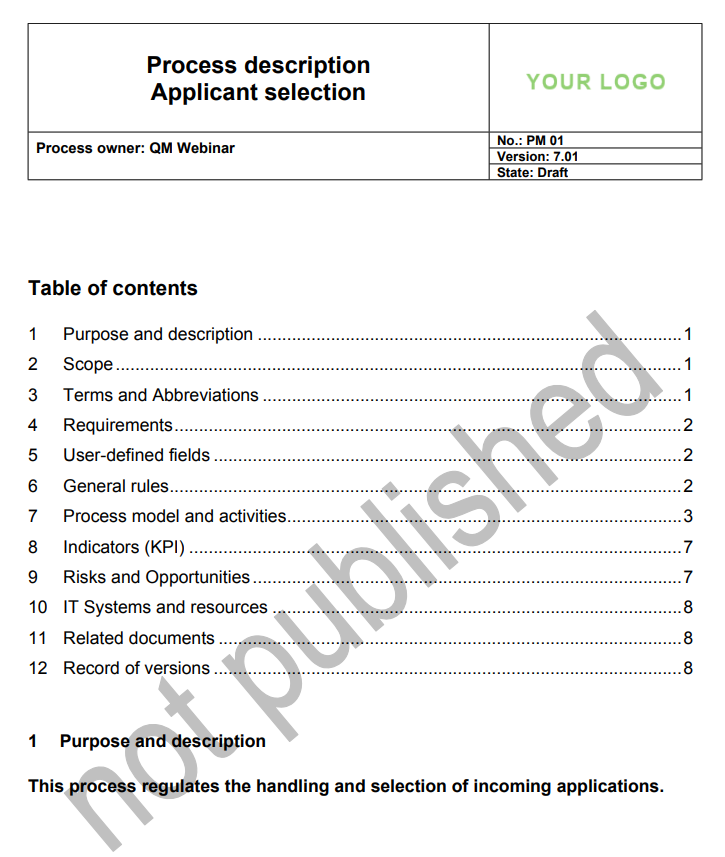
In Settings -> Configure Application -> Process management there is an option to add a watermark to the description of unpublished versions of a process / process group.
If this option is activated, the text 'not published' will be displayed on the first page of the process description for unpublished processes / process groups.
How did we do?
List: Process participants
