Table of Contents
AI Function SmartAI (Additional module)
This menu displays an overview of the monthly credits for the SmartAI feature. You can also enable or disable individual AI modules for the entire application and manage their behavior. Status credit…

Table of Contents
Status credits per month
Credits are the balance for using the AI modules. Depending on the complexity of your request, different amounts of credits can be used. This depends, among other things, on the amount of data that is input or output.
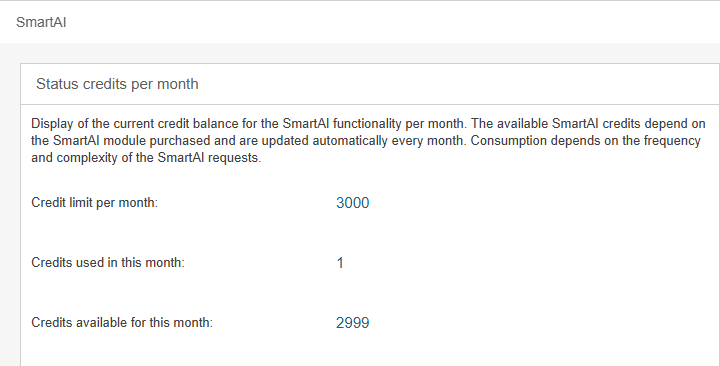
Credit limit per month | Credits are the credit balance for using the AI function. The credits are automatically reset to the purchased package volume at the beginning of each month. If no credits are available in a month, no more questions can be asked. However, any number of credit packages can be purchased or repurchased, and their volume is automatically added together. The credit packages can be canceled on a monthly basis. You can purchase new credits chargeable from us at any time via an email to support@cwa.de. |
Credits used in this month | Shows you how many credits have already been used in the current month. The display is reset at the beginning of each month. |
Credits available for this month | Zeigt Ihnen an, wie viele Credits Ihnen in diesem Monat noch zur Verfügung stehen. Die Anzeige wird am Anfang eines jeden Monats zurückgesetzt. If the credits for the current month have been used up, the system will display a message. 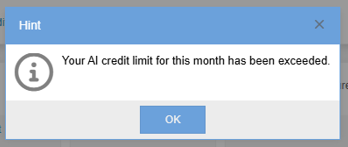 In this case, you can either wait for the start of the next month or you can purchase additional credits. |
SmartAI modules
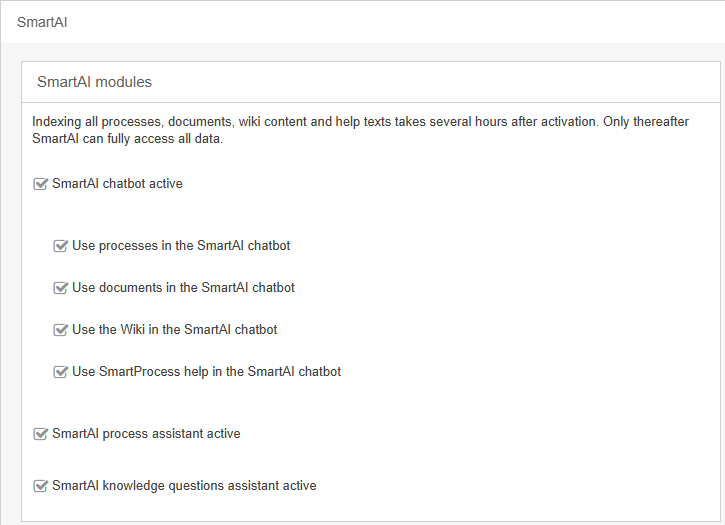
The SmartAI chatbot can be enabled or disabled for the entire application and thus for all users. If it is enabled, you can specify which sources the chatbot should use to answer user inquiries; the available options include published processes, published documents, entries in the Wiki menu, and the SmartProcess online help. | |
The SmartAI process assistant can be enabled or disabled for the entire application and thus for all users. | |
The SmartAI knowledge questions assistant can be enabled or disabled for the entire application and thus for all users. |
Information on the use of AI features and on data protection
In our AI architecture, the model is supplied exclusively with the relevant document context from your internal application. There is no technical access to the internet or external sources. The application does not perform web searches or retrieve external content. However, large language models have general, pre-trained language knowledge. By default, we instruct the model to use only the provided document context. In practice, the answers are therefore usually purely context-related. With generative AI systems, however, it cannot be ruled out with absolute certainty that general model knowledge may be incorporated in individual cases or that an answer may not be completely correct in terms of content.
Important notes on the use of AI-supported functions
The AI-based functions in SmartProcess can significantly facilitate the search for business process and document content. At the same time, it is crucial to be aware of the following limitations and potential risks:
- Quality and reliability of content
The AI creates content based on training data and algorithmic processing. This may result in inaccuracies, misunderstandings or factual errors. A thorough review of the data by the user is required.
- Linguistic deviations
Although the AI endeavours to provide content in the desired language, it can occasionally happen that texts appear in a different language - especially if relevant information is mainly available in this language. In such cases, manual translation may be necessary.
- Legal and cultural framework conditions
The special features of national laws, regulatory requirements or cultural customs may not be sufficiently taken into account. It is the responsibility of the user to check and adapt the content accordingly.
- Technical faults or failures
Despite a stable system architecture, it cannot be ruled out that erroneous output or functional interruptions may occur in individual cases. Such problems can affect the completeness or accuracy of the results or result in no content being generated.
- Copyright and similarity with existing works
It may happen that AI-generated texts unintentionally resemble existing content. In order to avoid possible copyright infringements, this content should be carefully analysed and, if necessary, revised before further use.
- Use in particularly sensitive areas
For critical or highly regulated fields of application, AI-generated content should only be used as a starting point. A final assessment by suitably qualified experts is absolutely essential.
- Lack of contextual depth
As AI is not always able to correctly interpret specific contexts or industry-specific knowledge, generated suggestions may be inappropriate or too general.
The automated information search functions are a useful tool. However, the responsibility for the final quality, correctness and compliance with legal standards lies solely with the user. It is also possible that some of the results are missing, incomplete or not delivered in the expected language.
- EU AI Act Compliance
Our AI functions are implemented as a supportive, non-high-risk AI system in accordance with the requirements of the EU AI Act. The system is used exclusively for information support and does not make any automated decisions with legal or economic implications. The AI functions only access approved company content. User input and content are not used for training or further developing the underlying AI models.
Users are transparently informed that this is an AI-supported system. Responsibility for the specific use of the AI functions and for decisions based on them lies with the respective customer.
Please note that CWA assumes no liability for the accuracy, legal admissibility or completeness of the content generated by the AI.
How did we do?
SmartAI chatbot
