Table of Contents
Version 21.3 Release Notes
A new calendar-based versioning scheme is used for SmartProcess since the year 2021. The previous version 9.1.0.10 is now followed by version 21.3 (year.month). Processes / Documents. Share feature -…

Updated
by Dennis Reichle
Table of Contents
A new calendar-based versioning scheme is used for SmartProcess since the year 2021. The previous version 9.1.0.10 is now followed by version 21.3 (year.month).
Processes / Documents
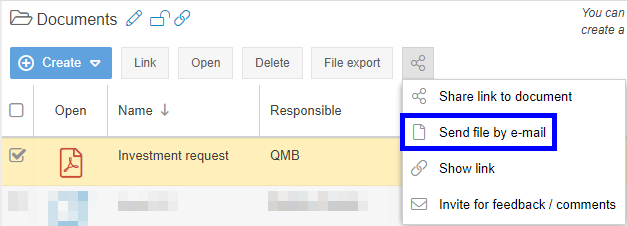
- Share feature - The new Share button allows other SmartProcess users to share a process or document. The following options are available:
- Share link to document -> Opens a new message in the e-mail software you have defined as default (e.g. Outlook). The mail contains the link to the latest version of the process / document that the recipient is allowed to see.
- Send file by e-mail (only for documents) -> For documents, the currently published version of the file attachment can also be sent by e-mail.
- Show link -> Opens a window in which the link to the process / document is displayed.
- Invite for feedback / comments -> Opens the function to request feedback on the process / document from other users.
- In the process management settings, it is possible to specify that the navigation area in the Processes menu should initially be hidden.
- In the process management settings, it is possible to specify that annotations to a process are only possible via the 'Feedback / Comment' workflow provided for this purpose. In this case, the original comment function is deactivated. If comments already existed for some processes, they are retained and can still be managed.
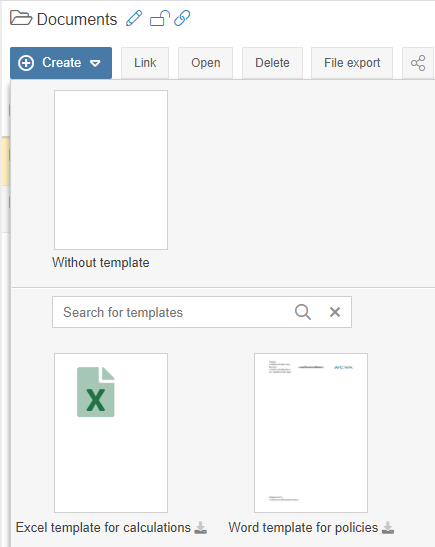
- Changes in the view to create a new document via the <+ Create> button:
- A preview is displayed for document templates in Word format.
- The document template can be downloaded via the download icon in the preview.
- A search bar has been integrated to search all document templates.
- User-defined fields can be created for all artifacts, e.g. to record individual information about IT systems.
- In the Versions window, the new columns 'Valid from' and 'Valid to' are available to view in which period a published version of the process / document was valid.
Workflows / Cases
- Form designer - In the properties of a field, the entries for selection lists can now be sorted using drag & drop.
- Form designer - For visibility constraints, it is possible to specify that a field should be hidden under the same conditions as another field ('Visibility same as field).
- Form designer - Field groups can be hidden in the case depending on other fields.
- Automatic sending of escalation e-mails can be deactivated individually for each timer object.
- Text modules for case e-mails can be copied.
- For text modules for case e-mails and signatures, additional placeholders are available for information about the sender of the e-mail (e.g. the mobile number).
- If there are several contact fields with e-mail addresses in a case, the recipient of an ad hoc e-mail can be selected from these e-mail addresses from a drop-down list.
- For tasks sent via the workflow object Send form via e-mail, the signature via a signature field is now supported.
General
- News entries on the start page can now already be created with an editor license (previously a designer license was required)
- When importing users, the new column 'Send access data to new user' can be used to specify whether the new user should receive his login data by e-mail after the import.
- The properties of a role can be exported as a PDF file.
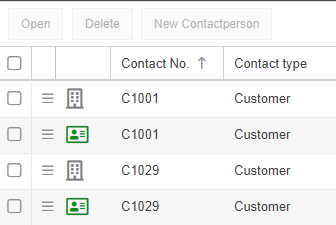
- Contacts menu - Multiple contacts can be selected by checkbox, e.g. to delete them at the same time.
- Contacts menu - In the contact list, an icon quickly indicates whether the contact is a company or a contact person.
- Security Assertion Markup Language (SAML) support for authentication (single sign on) of users in the cloud application. SmartProcess can be configured to use an external identity provider (IdP) to authenticate users using SAML 2.0.
You can see your current version in the menu "Settings - Info about version - Version".
How did we do?
Version 22.3 Release Notes
Version 9.1.0.10 Release Notes
