Introduction authorization profiles
In the Authorization profiles area, the central administration of access rights for different user groups takes place in SmartProcess.. In an authorization profile , you first configure which actions…

Updated
by Dennis Reichle
In the Authorization profiles area, the central administration of access rights for different user groups takes place in SmartProcess..
In an authorization profile, you first configure which actions a certain group of users (e.g. executives) is allowed to perform in SmartProcess.
Subsequently, at least one authorization profile is assigned to each user in the User administration setting.
By assigning the authorization profile "Executives", the user is then allowed to perform exactly those actions in SmartProcess that were previously defined for this profile in the Authorization profiles setting.
Subsequently, at least one authorization profile is assigned to each user in the User administration setting.
By assigning the authorization profile "Executives", the user is then allowed to perform exactly those actions in SmartProcess that were previously defined for this profile in the Authorization profiles setting.
In each authorization profile, there are several tabs to set the access rights for the different menus in SmartProcess.
For each tab, a separate article is linked in the following table, where the effects of the respective settings are described in detail:
FAQ for the general administration of authorization profiles
How to create a new authorization profile?
1.) New item
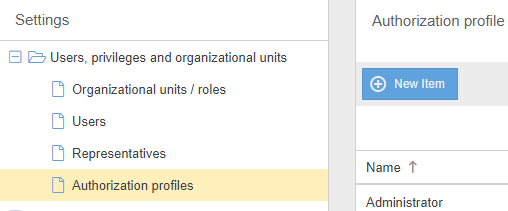
Use the <+ New item> button to create a new authorization profile for which you can assign a new name and in which all permissions are initially set to 'No'.
2.) Copy existing authorization profile
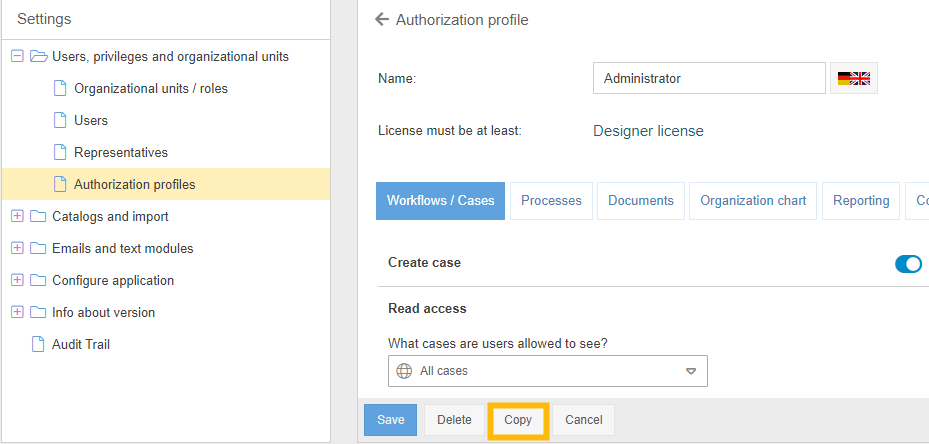
Open an existing authorization profile from the list and click <Copy>. Based on the existing permission profile, a copy will be created with the same permissions and the suffix '- Copy'. From this point on, the copy template and the copy can be modified independently of each other.
Use the <+ New item> button to create a new authorization profile for which you can assign a new name and in which all permissions are initially set to 'No'.
2.) Copy existing authorization profile
Open an existing authorization profile from the list and click <Copy>. Based on the existing permission profile, a copy will be created with the same permissions and the suffix '- Copy'. From this point on, the copy template and the copy can be modified independently of each other.
How many authorization profiles can be created?
An unlimited number of authorization profiles can be created. So you can differentiate the permissions of different user groups as fine as you like.
How to delete an authorization profile?
Open an existing authorization profile from the list and click <Delete>.
Before deleting, be sure to check whether the authorization profile is really no longer needed. If the authorization profile is still assigned to users or used in the rights for workflow participants, these associations should be removed first.
Before deleting, be sure to check whether the authorization profile is really no longer needed. If the authorization profile is still assigned to users or used in the rights for workflow participants, these associations should be removed first.
Authorization profiles already exist, although I have not created any. Why?
When SmartProcess is installed, CWA provides some default authorization profiles. These are configured in such a way that the possibilities of the respective license with the same name are utilized. A user to whom you assign an Editor license can therefore be assigned the standard Editor authorization profile to match it.
You can use these standard authorization profiles for orientation, but you can also edit and delete them just like any other authorization profile.
You can use these standard authorization profiles for orientation, but you can also edit and delete them just like any other authorization profile.
What does 'License must be at least' mean?
When you edit an authorization profile, a required minimum license is displayed below the name field.
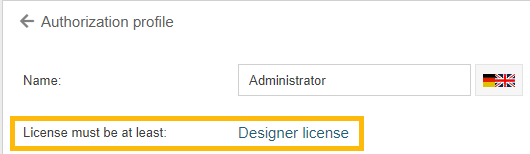
This is an indication of the minimum license a user needs when this authorization profile is assigned to him. So, in the example, a user would need to be assigned a Designer license to be able to perform the actions in SmartProcess that you have set for the 'Administrator' authorization profile.
To determine this, SmartProcess checks every assigned permission in all tabs. If at least one permission has been activated that is only allowed with a Designer license (e.g. write access to processes), 'Designer license' is displayed as the required minimum license.
If, due to changes in an authorization profile, the assigned license is no longer sufficient for a user to execute all permissions, the over-assigned permissions are deactivated for this user when logging in.
Example:
- Mr. Müller has an authorization profile named 'Viewer' and a Viewer license assigned.
- Now in the authorization profile 'Viewer' the permission 'Write access to processes' is set to active -> A Designer license would be required to exercise this permission.
- Mr. Müller can now still log in to SmartProcess with his viewer license. When logging in, the permission 'Write access to processes' is simply ignored for Mr. Müller, because his viewer license is not sufficient for this.
Note: When you edit an authorization profile, the calculation of the minimum license does not change until you have saved the authorization profile once and then reopen it.
This is an indication of the minimum license a user needs when this authorization profile is assigned to him. So, in the example, a user would need to be assigned a Designer license to be able to perform the actions in SmartProcess that you have set for the 'Administrator' authorization profile.
To determine this, SmartProcess checks every assigned permission in all tabs. If at least one permission has been activated that is only allowed with a Designer license (e.g. write access to processes), 'Designer license' is displayed as the required minimum license.
If, due to changes in an authorization profile, the assigned license is no longer sufficient for a user to execute all permissions, the over-assigned permissions are deactivated for this user when logging in.
Example:
- Mr. Müller has an authorization profile named 'Viewer' and a Viewer license assigned.
- Now in the authorization profile 'Viewer' the permission 'Write access to processes' is set to active -> A Designer license would be required to exercise this permission.
- Mr. Müller can now still log in to SmartProcess with his viewer license. When logging in, the permission 'Write access to processes' is simply ignored for Mr. Müller, because his viewer license is not sufficient for this.
Note: When you edit an authorization profile, the calculation of the minimum license does not change until you have saved the authorization profile once and then reopen it.
I have edited an authorization profile, but the changes do not take effect. Why?
For changes to the authorization profile to take effect for a user, the user must log out of SmartProcess once and log back in.
Is it possible to assign multiple authorization profiles to a user?
Yes. If multiple authorization profiles are assigned to a user, the "strongest" right will prevail.
Example:
- There are the authorization profiles "Manager" and "Administrator" with different settings.
- The user Max Mustermann is assigned both authorization profiles.
- The authorization profile "Manager" is set so that users with this profile are not allowed to see all processes.
- The authorization profile "Administrator" is set to allow users with this profile to see all processes.
- When Max Mustermann logs on, he is allowed to see all processes because he has at least one authorization profile assigned to him that allows him to do so.
Example:
- There are the authorization profiles "Manager" and "Administrator" with different settings.
- The user Max Mustermann is assigned both authorization profiles.
- The authorization profile "Manager" is set so that users with this profile are not allowed to see all processes.
- The authorization profile "Administrator" is set to allow users with this profile to see all processes.
- When Max Mustermann logs on, he is allowed to see all processes because he has at least one authorization profile assigned to him that allows him to do so.
How did we do?
Authorization profile - Tab Workflows / Cases
