Table of Contents
Object: Artifacts KPI, Risk, Control, Opportunity
General information. The objects KPI, Risk and Opportunity belong to the artifacts. The possibilities for creating and linking artifacts in the process model are described in the article Artifacts in…

Table of Contents
General information
 | KPI |
 | Risk |
 | Control |
 | Opportunity |
If KPIs, Risks, Controls or Opportunities have been inserted as objects in the process model, they are subsequently also visible in the process details below the process model in the corresponding tables. In these tables, you can also use the <Add> button to assign measures, risks or opportunities to the process without an extra symbol appearing in the process model.

The basic principle is that objects that were created in the process model via drag & drop can only be removed by editing the process model (in the example 'Share of rejects'). Objects that were created in the process details tables can also be removed without editing the process model using the trashcan symbol (in the example 'Number of orders').
If one of the objects was linked directly to a task, the object is also listed in the properties of the task in the process description.
KPI
The artifact KPI is used in the process model to represent relationships, such as :
- A process or a task in a process influences the value of a KPI.
- For a task in the process flow, a certain KPI has to be captured or considered
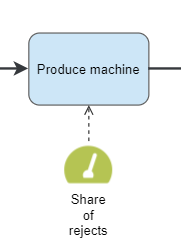
The example shows that the task 'Produce machine' affects the KPI 'Share of rejects' and has to be monitored during the process flow.
By double-clicking on the symbol, additional information for this KPI is displayed and can be edited. This includes:
- The name of the KPI and a more detailed description
- A hyperlink to link to further information or a contact person for the KPI
- The formula for calculating the KPI is stored in the field Calculation base
- Company internal targets and thresholds for the KPI
- The unit in which the KPI is measured
- The interval at which the KPI should be recorded regularly (Capture frequency)
- In the area 'Used in process' it is displayed in which processes the KPI was reused
- Via Add document, one or more file attachments can be added, in which, for example, a document is stored in case the ratio is currently rated worse than the targeted threshold value.

Link to a KPI case
To be able to actively record and evaluate the KPI documented in the process in SmartProcess, a new KPI workflow case has to be created or an existing KPI case must be linked to this object.

The window that opens is the main form of the KPI workflow, which thematically switches from process management to case processing. The data from the KPI object is transferred into the form.
Only the field 'Responsible' has to be filled, because the case must now be assigned to an employee, so that this employee is reminded weekly by SmartProcess to enter the KPI 'Share of rejects'. With a click on the magnifying glass a list of all users opens, from which a responsible user can be selected. Click on Save to start the KPI process.

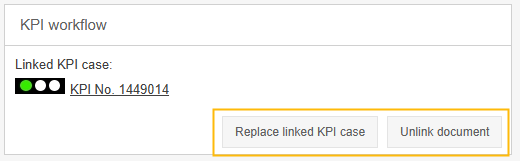
If a new case is created in this way or an existing one added, the KPI case is linked to the KPI object from the process model, what is also shown in the properties window.

The link can be removed or replaced at any time at a later date:
Risk
The artifact risk is used in the process model to represent relationships, such as:
- The execution of a task can result in a risk for the company
- A risk should be considered when performing a task
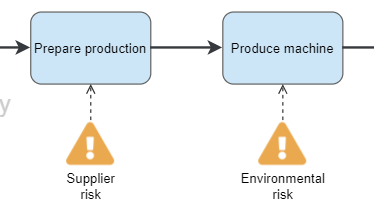
In the example, the task 'Prepare production' involves the risk that a supplier will not deliver the required means of production on time or not at all, and the task 'Produce machine' involves the risk that nature will be overburdened by the production process and will exceed the standard values.
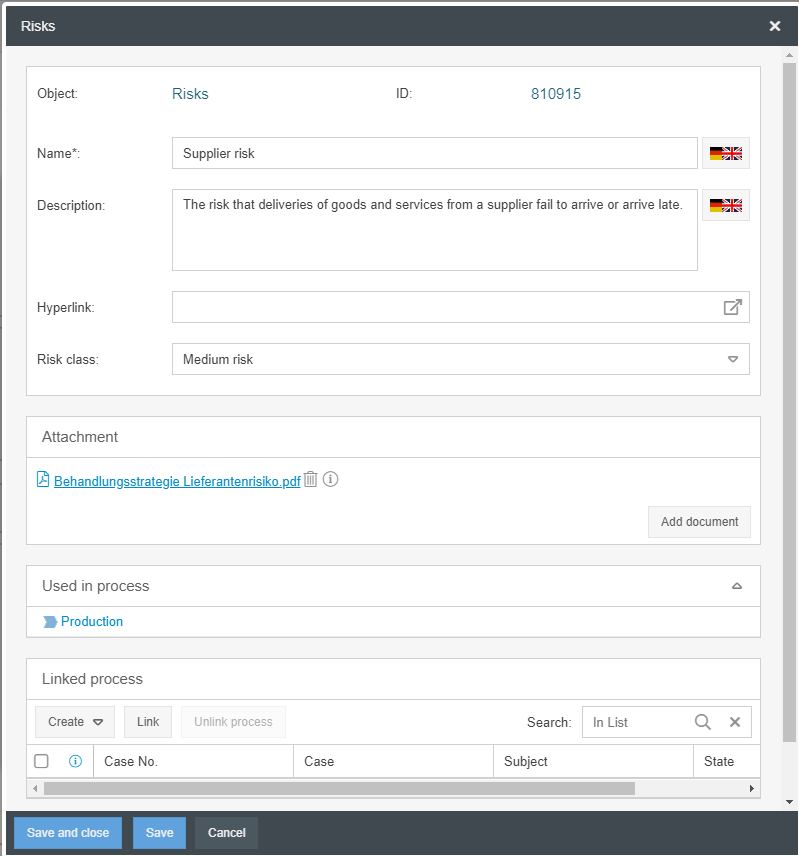
By double-clicking on the symbol, additional information for the risk is displayed and can be edited. This includes:
- The name of the risk and a more detailed description
- A hyperlink to link to further information or a contact person for the risk
- The risk class for which a classification into high, medium or low risk can be made
- The 'Used in process' area shows the processes in which the risk was reused
- Via <Add document>, one or more file attachments can be added, for example by specifying the treatment strategy for this risk
Link to a workflow case
The risk modeling object can be linked to one or more risk cases in order to actively monitor the documented risk from the process model in one case.
In contrast to the KPI modeling object, the linking of a workflow case is more flexible with the risk modeling object:
- With <Create> a new case of any workflow can be created and linked to the risk object in the process model at the same time
- Via <Link> an already created risk case can be subsequently linked to the risk object in the process model
- With <Unlink process> the link between workflow cases and the risk object can be removed again afterwards.
Opportunity
The artifact opportunity is used in the process model to illustrate when during the execution of a process or a task opportunities for the company could arise, which are examined and used if applicable.
In the example, the task 'Prepare Production' has the chance that the material required for production can be purchased at lower cost. Therefore, there should be a regular check to see whether the supplier's price is still justified or should be renegotiated.

With the exception of the risk class, the properties of the opportunity object correspond to those of the risk object.
The Opportunity object can be linked to one or more workflow processes in order to actively check and evaluate the opportunity documented in the process model on a regular basis in SmartProcess. The possibilities of the link are identical to the possibilities shown for the risk object.
Control
The control artifact is used in the process model to show that there are corresponding control mechanisms for existing process risks. They are therefore linked either directly to the risk or to an associated task.
The properties of the control object correspond to those of the risk object, with the exception of the risk class.
The control object can be linked to one or more workflow cases in order to actively and regularly check and evaluate the control documented in the process model in SmartProcess. The linking options are identical to the options shown for the risk object.
Reporting
In the Reporting menu, it is possible to evaluate the modeled KPIs, Risks, Controls and Opportunities across all processes. For example, you can list an overview of all KPIs that are recorded in the company, including a reference to the process that influences the rating of this KPI.

Despite the similarity of names and any links that may have been established, the process objects and the actively executed cases are evaluated independently of each other, so that the number and names of the entries may differ in these two areas.
How did we do?
Object: Data object Input / Output, Adjacent process
Object: Artifact Related document
