Menu Cases
In the Cases menu, new cases can be started and open, not yet completed cases can be viewed and edited. The type of case to be started is based on the workflows implemented in SmartProcess. Cases are…

In the Cases menu, new cases can be started and open, not yet completed cases can be viewed and edited. The type of case to be started is based on the workflows implemented in SmartProcess.
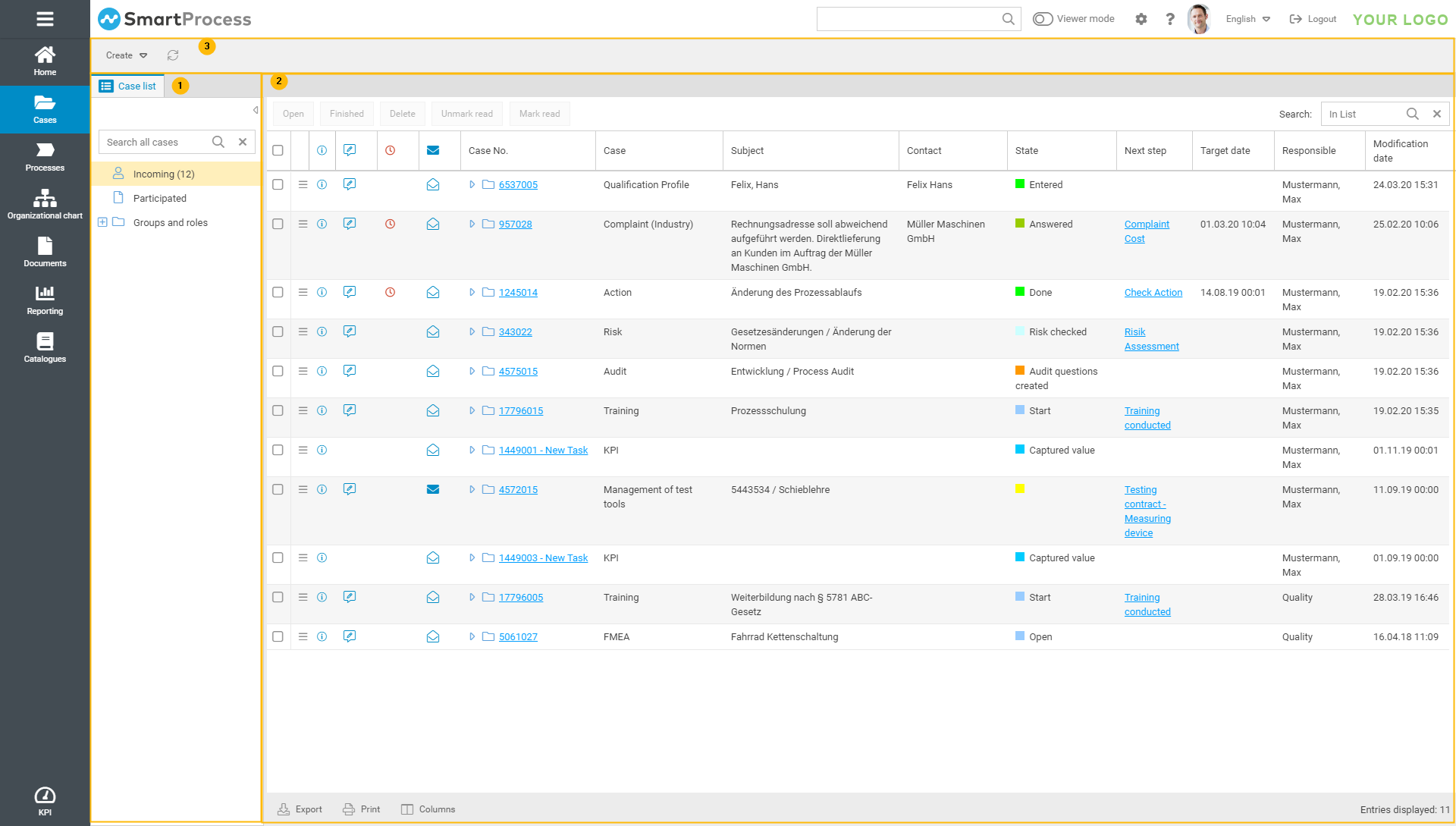
| The navigation area contains:
|
| In the content area, the case list with the cases of the selected area are displayed. You can open and edit the cases from here. |
| The navigation bar contains:
|
Special columns in case list
Column | Description |
 | This icon opens the context menu of the case. Using the context menu, new tasks can be added to the case ad hoc, provided the user has a corresponding authorization profile. |
 | This icon can be used to display the details of the process in a preview window. In this view, the activity list is not displayed. |
 | This icon opens the process and switches directly to editing the details of the process. Depending on the user's permissions, this icon may be without function if the user is not allowed to edit the details of the main form. |
 | This icon is displayed for tasks whose deadline has been reached or exceeded. |
 | This column shows that the process has changes that are unread A change to a case is always recognized when the responsibility changes or the content is changed. This includes the reading of an e-mail that is added to the case in the activity list. |
 or read
  .
.How did we do?
Creating a new case
